










New ML_ batch file (Self Extractor_###.bat)
Effective April 1st 2006 any new version of MAINLOG installed will not handle the ZL9 file that our batch file currently creates. In order to make all of our units compatible with MAINLOG we will need to download a new batch file for each of our trailers. The new batch file will create a ML_ file. Any occurrences of the old batch files may be deleted. To download the file, follow the steps below.
| 1 | LEFT-Click on the appropriate TDS Site number
at the bottom of this page |
 |
|
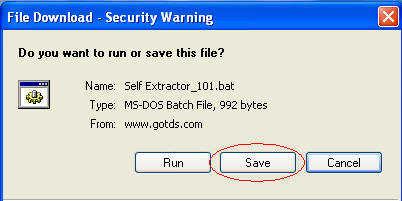
| 2 | Click SAVE | ||
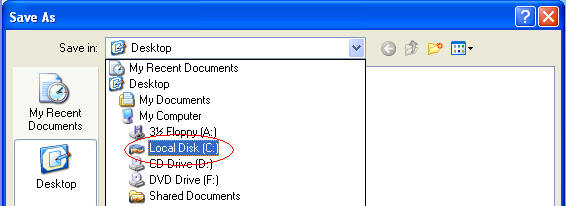
| 3 | Select Local Disk (C): from the drop down menu |
 |
|
| 4 |
The contents of your C: drive will appear in the next drop down
window. Select the MAINLOG folder by double
clicking on it.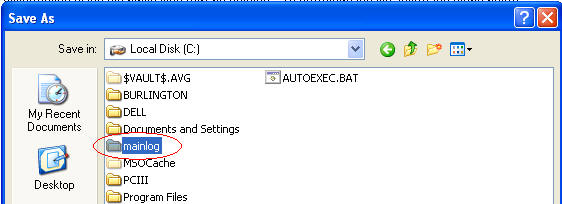 |
||
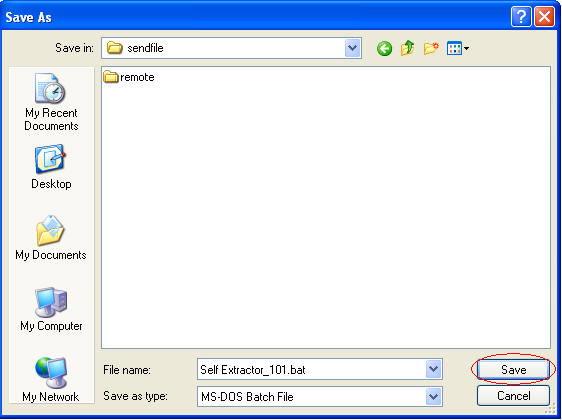
| 5 | The contents of your MAINLOG folder will appear in the next drop down window. Select the SENDFILE folder by double clicking on it. When you have opened the sendfile folder, hit the SAVE button. |
 |
|
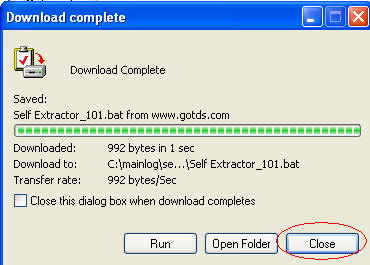
| 6 | When the download has completed, simply click the CLOSE button. |
 |
|
|
When you are ready to
send in your log , open Mainlog, select FILE then SEND FILES,
then run your self extractor file by double clicking on your new
shortcut, and then double click on the FTP.exe to upload your
log. |
|||
|



